Emails sent to an Outlook.com, Hotmail, Live or MSN address used to just arrive, but since around November 5, 2026, some of them have been bouncing back to the sender with “550 5.7.23” (an SPF validation error) or “550 5.7.1 Message rejected: Message lacks SPF/DKIM/DMARC Auth Records (AS9031519)“, and the person on the Outlook.com side often has no idea the email never made it. This guide will explain what the bounce means and what both the sender and the recipient can do about it.
Also see: Outlook Email Shows Up in Search but Not in the Inbox
What does the 550 5.7.23 or 5.7.1 bounce mean?
Both codes mean Microsoft’s servers refused the email before it reached the inbox. The 550 5.7.23 line talks about an SPF (Sender Policy Framework) violation, but that’s usually just the outer wrapper of the bounce. The actual reason sits further down in the bounce’s details: “Message lacks SPF/DKIM/DMARC Auth Records“.
SPF, DKIM and DMARC are three small records in the sender’s domain settings (DNS) that prove an email really came from that domain. Microsoft has required all three since 2025, but only for domains that send more than 5,000 emails a day to Outlook.com, Hotmail and Live addresses, and that rule bounces with a different code (550 5.7.515). What changed around November 5 is that much smaller senders, even personal domains that send very little email, started getting bounced too.
A few things are known so far:
- It only hits Microsoft’s consumer mailboxes (outlook.com, hotmail.com, live.com and msn.com). Email to Microsoft 365 business mailboxes goes through as usual.
- It’s on and off. The same email can bounce once and go through when it’s sent again a few minutes later.
- Senders on Microsoft 365, Google Workspace, Zoho and their own mail servers have all reported it.
- Most of the bounced domains had no DMARC record, even though their SPF (and often DKIM) was set up fine.
- Some senders with all three records set up correctly still got bounced.
Microsoft has since acknowledged an ongoing service issue with mail to Outlook.com, Hotmail and Live addresses and says it’s investigating the cause. There’s no fix or timeline yet, so here’s what each side can do for now.
If you’re the one with the Outlook.com or Hotmail address
There isn’t much you can change on your end. You can’t add SPF, DKIM or DMARC records to an @outlook.com or @hotmail.com address, because Microsoft manages those domains. Adding the sender to Safe senders won’t help either, since the email is refused before it reaches your mailbox.
What you can do:
- Ask the sender to send it again. A resend a few minutes later often gets through.
- Tell the sender about the bounce and ask them to pass the full bounce message to whoever runs their email (their IT person or their email provider). Anything they can fix is in their domain’s settings, not your mailbox.
- Check in with people who’ve gone quiet by phone or text. Their emails might be bouncing without you knowing.
- Report it to Microsoft from Outlook.com (see the last section below).
Check whether the sending domain has a DMARC record
If you’re the sender and only one email bounced, try sending it again first. If it keeps happening, start here, because a missing DMARC record is what most bounced domains had in common. The domain is the part after the @ in your email address.
Using MXToolbox
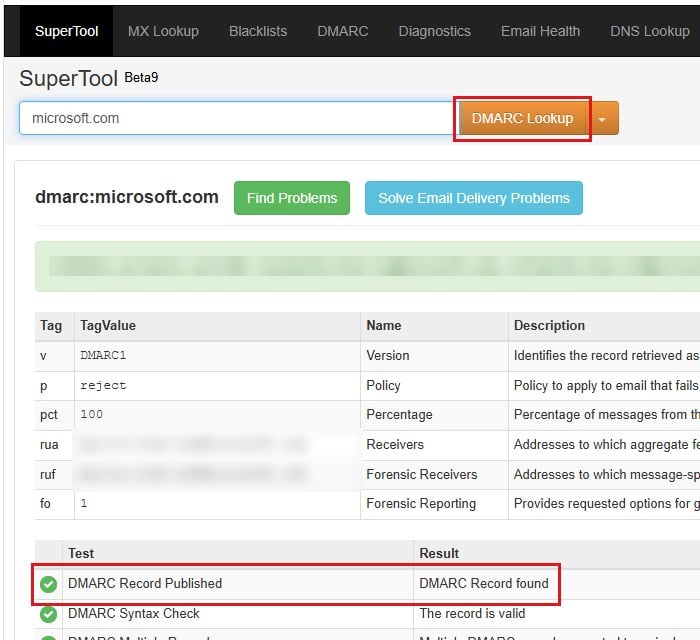
- Go to
https://mxtoolbox.com/dmarc.aspxin your browser. - Type “yourcompany.com” (your own domain) into the box and click DMARC Lookup.
- Look for “DMARC Record found“. If it says “DMARC Record Not Found” instead, there isn’t one.
Using PowerShell
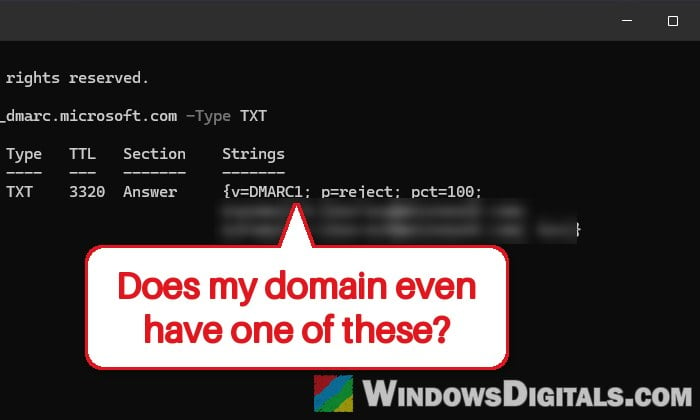
- Open PowerShell (search for it in the Start menu).
- Run the following command, with your own domain after
_dmarc.:Resolve-DnsName _dmarc.yourcompany.com -Type TXT
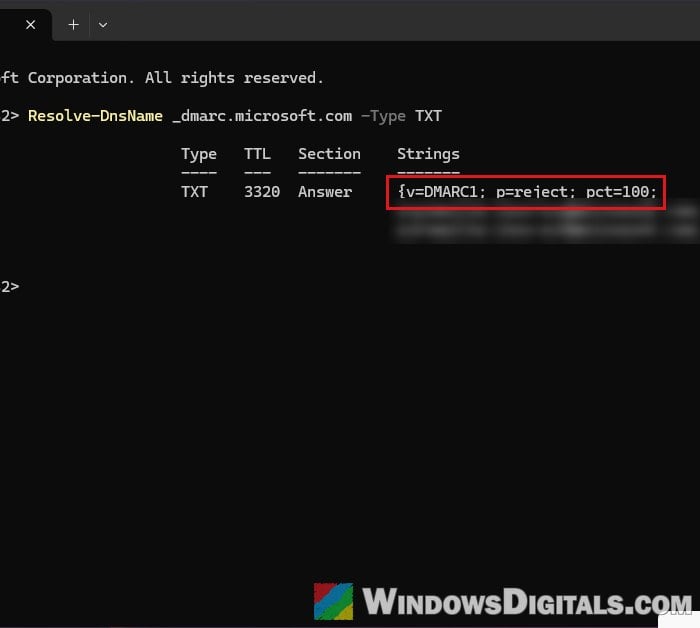
- A DMARC record starts with
v=DMARC1. If nothing like that comes back, there isn’t one.
In Command Prompt, nslookup -type=TXT _dmarc.yourcompany.com does the same thing.
Might be useful: Nslookup.exe keeps popping up, uses high CPU, is it virus?
Add a DMARC record to your domain
This is the workaround reported most often on Microsoft’s forums and Reddit, and it has stopped the bounces for many senders. A DMARC record is one line of text added where your domain’s DNS is managed (usually where you bought the domain).
Here’s what to add:
- Sign in to your domain registrar or DNS host and open the DNS settings for your domain.
- Add a new record with these values:
- Type: TXT
- Name (or Host):
_dmarc(not@) - Value:
v=DMARC1; p=none; rua=mailto:[email protected]
- Save it. The
rua=part is optional. It’s an address that receives daily reports about mail sent with your domain, so use a mailbox you actually have.
A p=none policy is “monitor only” and doesn’t tell other providers to block anything. Microsoft’s own advice is to start there and move up to p=quarantine, then p=reject, once the reports look clean. If your domain already has a DMARC record with a stricter policy, don’t lower it to p=none as a fix. Only one _dmarc record should exist per domain.
If you only use the onmicrosoft.com domain that comes with Microsoft 365, add the record in the Microsoft 365 admin center instead:
- Go to Show all > Settings > Domains and select your onmicrosoft.com domain.
- Open the DNS records tab and click Add record.
- Choose TXT (Text) as the type, enter
_dmarcas the TXT name and your DMARC line as the TXT value, then click Save.
DNS changes can take a few hours to spread. Then send a few test emails to an Outlook.com or Hotmail address at different times of day.
Make sure SPF and DKIM are set up properly too
A DMARC record only passes when SPF or DKIM passes and matches the domain in your From address, so check the other two:
- SPF: Your domain should have exactly one SPF record, listing every service that sends email for you, and staying under 10 DNS lookups. For a domain that only sends through Microsoft 365, it’s usually
v=spf1 include:spf.protection.outlook.com -all. - DKIM: Turn on DKIM signing with your own domain in your email provider’s settings. Microsoft 365 signs with its onmicrosoft.com domain until you do, and that signature doesn’t count toward DMARC for your own domain.
If you’re not sure what these should look like, ask your email provider. Moving your DMARC policy up to p=quarantine or p=reject before SPF and DKIM pass can get good mail rejected by other providers too, not just Outlook.com.
Suggested read: GoDaddy Outlook Sign-In Says “This sign-in page is being retired”
Report it to Microsoft if it still bounces
If your SPF, DKIM and DMARC all check out and emails to Outlook.com or Hotmail still bounce now and then, it’s most likely the service issue on Microsoft’s side.
If it keeps happening, report it so Microsoft has real examples to work with:
- Senders can use Outlook.com’s sender support form at
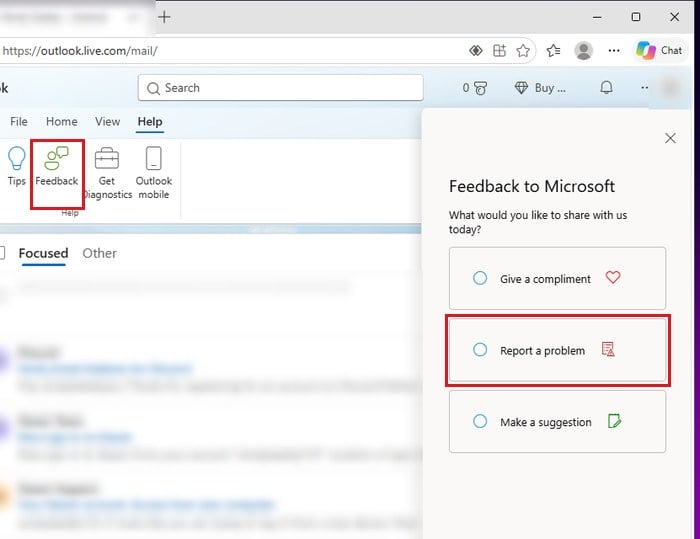
https://go.microsoft.com/fwlink/?LinkID=614866, with the full bounce message, the time it happened and your sending IP if you know it. Microsoft 365 admins can also open a support request in the Microsoft 365 admin center. - Outlook.com users can report it from Outlook.com itself, through Help > Feedback > Report a problem, with any bounce messages your contacts sent you.
Even once Microsoft fixes it, keep the DMARC record if you added one. It’s what Microsoft already asks of bigger senders, and once you move it up to p=quarantine or p=reject, it also makes it harder for anyone to send email pretending to be from your domain.