If you’re searching for WizTree to find out what’s eating up your disk space, you’ve probably noticed that the search results show several download sites, and it’s not always obvious which one is the real one. This guide will show you where the official WizTree download is, how to check that the file you got is genuine, and a quicker way to install it with a single command.
Also see: How to Clean C: Drive in Windows 11
Page Contents
What is the official WizTree website?
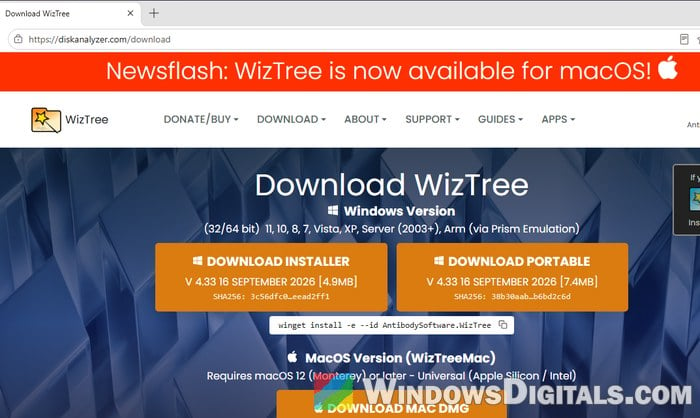
The official WizTree website is diskanalyzer.com. WizTree is made by Antibody Software Limited, and the company’s own site, antibody-software.com, links to diskanalyzer.com for WizTree. The link inside the WizTree app also opens diskanalyzer.com, and users on Reddit pointed this out when someone asked which WizTree link was legit.
As of this writing, the latest version is WizTree 4.33, released on September 16, 2026. It’s free for personal use. Only businesses need to buy a Supporter code or an Enterprise license, so you never need to pay anything to use it at home.
There’s a good reason to be careful with this one. Fake download pages for popular free tools are nothing new, and some attackers even pay for search ads that look like the real site. In October 2026, for example, BleepingComputer reported on Google search ads that went through Bing’s own redirect links to look trustworthy before sending people to a fake download page. That’s why it’s best to skip the “Sponsored” results entirely.
How to download WizTree from the official site
The safest way is to type the address yourself instead of clicking a search result. Here’s how to do it:
- Open your browser and type
https://diskanalyzer.com/downloadinto the address bar, then press Enter. - Check the address bar again. It should show diskanalyzer.com, not a similar-looking name.
- Click “DOWNLOAD INSTALLER” for the normal setup file, or “DOWNLOAD PORTABLE” if you want a ZIP version that runs without installing.
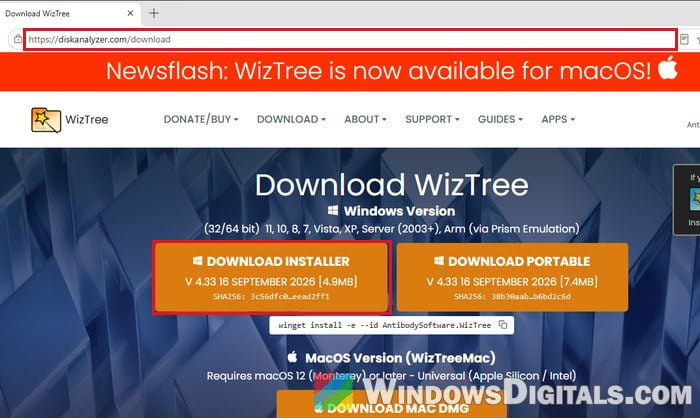
- Wait for the download to finish. The installer is named something like
wiztree_4_33_setup.exeand is only about 5 MB.
Before you run it, take a minute to check that the file really comes from Antibody Software.
Check the file’s digital signature
The real WizTree installer is digitally signed by its developer. If anyone changes the file, the signature stops being valid, and a fake copy won’t carry Antibody Software’s signature. To check it, follow the steps below:
- Open File Explorer and go to your “Downloads” folder.
- Right-click the WizTree file and select “Properties“.
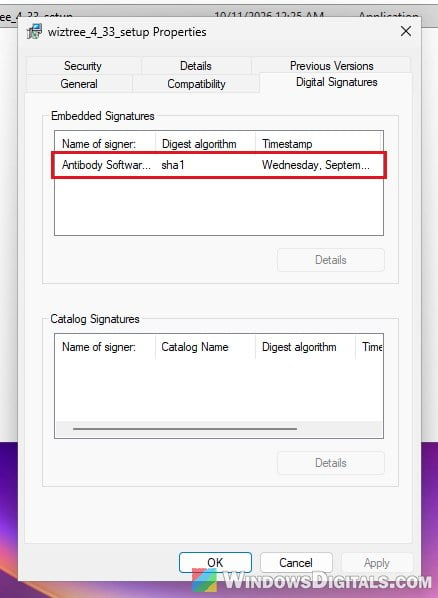
- Go to the “Digital Signatures” tab. Under “Name of signer“, it should say Antibody Software Limited.
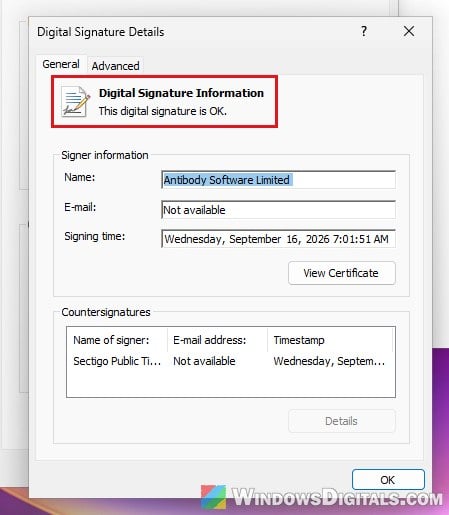
- Click the signature in the list, then click “Details“. The window should say “This digital signature is OK.“
If the Digital Signatures tab is missing, or the signer is anything other than Antibody Software Limited, delete the file and download it again from diskanalyzer.com.
Compare the file hash (optional)
The download page also shows a SHA256 value under the download button (shortened, like 3c56dfc0…eead2ff1 for the 4.33 installer). If you want to be extra sure, you can compare it with your file:
- Open PowerShell (search for “PowerShell” in the Start menu).
- Run the following command. If your file has a different name (a newer version, or a “(1)” copy), change the file name in the command to match.
Get-FileHash "$env:USERPROFILE\Downloads\wiztree_4_33_setup.exe"
- Compare the start and end of the Hash value with the one on the download page. They should match.
Pro tip: How to Scan an .exe File for Viruses to Check If It’s Safe
Install WizTree with winget instead
If you’re comfortable with a command line, there’s an even simpler way. The official download page itself lists a command for winget, Windows’ own package manager. Winget downloads the installer straight from diskanalyzer.com and checks its hash for you before installing it.
- Open “Command Prompt” as administrator (search for “cmd” in the Start menu, then select “Run as administrator“).
- Run the following command:
winget install -e --id AntibodySoftware.WizTree
- If you’re asked to agree to the source agreements, type “Y” and press Enter.
- Wait until it says “Successfully verified installer hash” and then “Successfully installed“.
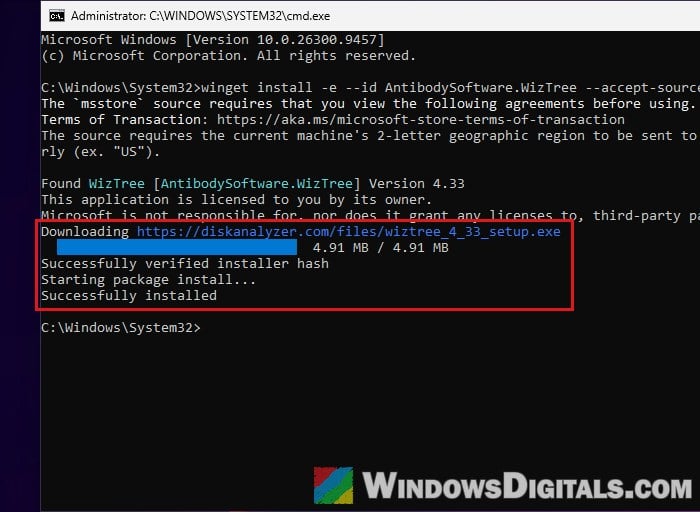
The winget package is published by Antibody Software and pulls the same setup file from diskanalyzer.com, so it’s no different from clicking the download button. Once it’s done, WizTree shows up in your Start menu.
Related guide: Clear Cache (Memory, Browsers, Temp Files) in Windows 11/10
Is WizTree itself safe to use?
Yes, as long as it’s the real one from diskanalyzer.com. It’s a legitimate disk space analyzer, and it’s signed by its developer, Antibody Software. It scans much faster than most disk analyzers because it reads the drive’s Master File Table (MFT) directly instead of going through every folder one by one.
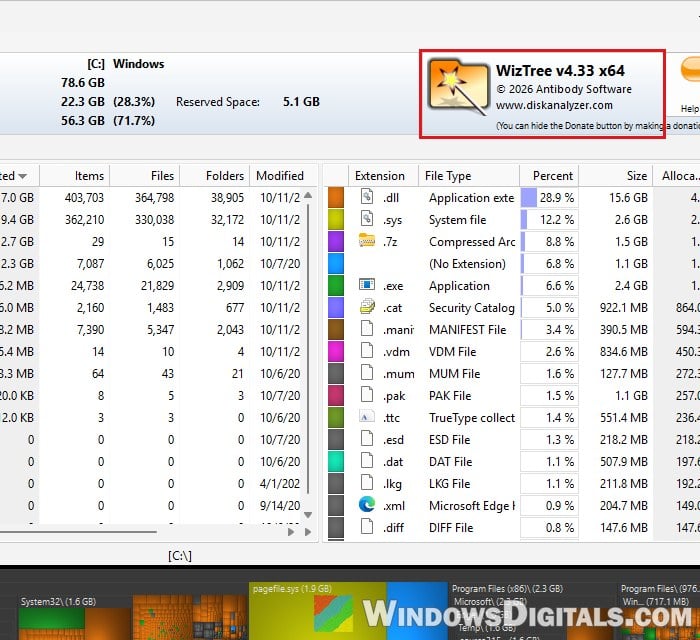
Windows will ask for admin permission when you open WizTree. That’s normal. It likely needs admin rights to read the MFT directly, and it still works without them, just more slowly. Once a scan finishes, you’ll see your largest folders and files, which you can then clean up yourself.
Might be useful: Delete Windows.Old Folder in Windows 11/10, Access Denied?
What if diskanalyzer.com won’t open?
One user on Reddit couldn’t open the official site at all, and commenters pointed them to other download pages. Other users could open the site just fine, though, so it was most likely a DNS problem on that person’s side.
Before you grab WizTree from somewhere else, try again later or from a different network. If you still end up downloading it from a mirror, always check the digital signature as shown above before running it.
If you’d rather use something else, WinDirStat (https://windirstat.net/) is the one that comes up in Reddit threads about WizTree. It does the same job, just more slowly (WizTree’s developer claims WizTree is 46 times faster).