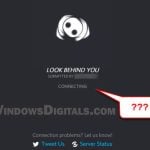
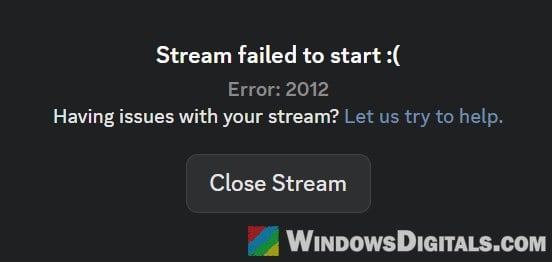
If you click on a friend’s stream in Discord and it just keeps loading until it fails with “Stream failed to start” and Error: 2012, often while you can still hear the stream’s sound but see no picture, the problem is that your Discord app couldn’t set up the video connection to that stream in time. This guide will help you get the stream to load again, with fixes for both the viewer and the person streaming.
Also see: Discord Stream Keeps Freezing: How to Fix it
What does Discord error 2012 mean?
According to Discord’s own list of audio and video error codes, 2012 is a “Video Viewer Timeout”. It shows up when you try to watch a stream, but your app can’t make the first connection to it. Error 2015 belongs to the same group.
It’s a viewer-side error, but the cause isn’t always on the viewer’s PC:
- Only you get it: the problem is most likely your app, your connection or a VPN.
- Everyone watching one streamer gets it: the problem is more likely on the streamer’s side, such as their resolution or graphics card. Often, viewers on the phone app or in a browser can still watch while everyone on the desktop app gets 2012.
That’s why some of the fixes below are for the streamer.
Quit Discord completely and open it again
Discord’s first step for this error is to fully close the app and start it again. The catch is that, by default, clicking the X on the Discord window doesn’t close it on Windows. It only hides Discord in the system tray, where it keeps running in the background.
To fully restart Discord:
- Click the small arrow on the right side of the taskbar to show the hidden icons.
- Right-click the Discord icon and select “Quit Discord“.
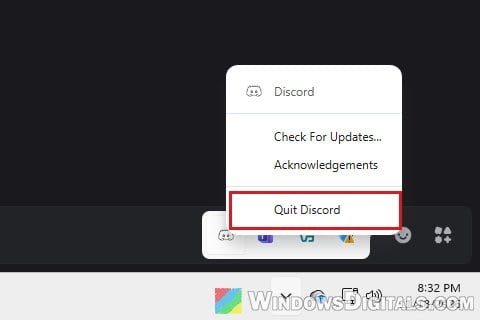
- Wait a few seconds, then open Discord again from the Start menu.
- Join the voice channel and click the stream again.
It’s also worth asking the streamer to stop the stream and start it again.
Turn on hardware acceleration in Discord
For error 2012, Discord’s guide recommends turning on hardware acceleration, along with checking your network. In the app, the setting is described as using your GPU to make Discord run more smoothly.
Here’s how to check it:
- Click the gear icon (User Settings) at the bottom left of Discord.
- In the left pane, under “Experience“, select “System“.
- Under “General“, turn on “Enable Hardware Acceleration“.
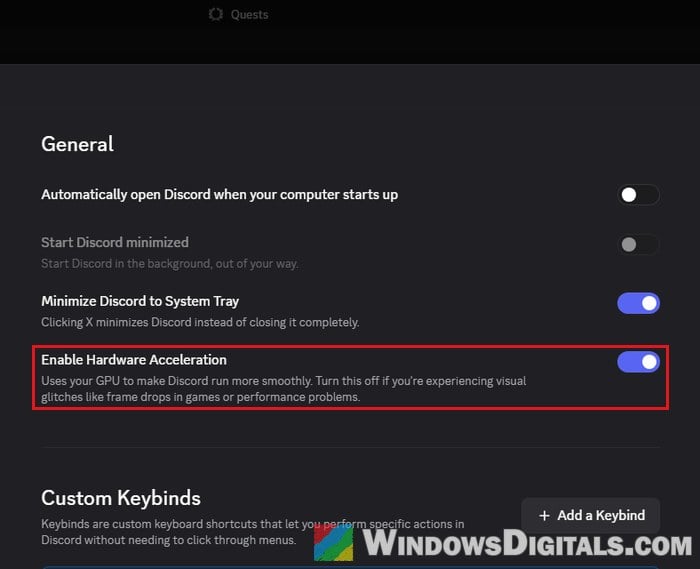
- If Discord asks to restart, let it.
If it was already on, try turning it off and on again. This doesn’t fix it for everyone, so if nothing changes, move on.
Linked issue: Discord Stream (Screen Share) Lag, Low Quality or FPS Drop
Check your connection and turn off your VPN
Since 2012 is a timeout, anything that slows down or blocks the connection to the stream can cause it, so Discord suggests checking that your internet is fast and stable. If YouTube or downloads are also struggling, fix that first.
If you use a VPN or proxy, turn it off for a moment and try the stream again (unless Discord is blocked where you are and you need the VPN to reach it). Sometimes only the device on a VPN gets 2012 while the others can watch it fine. If the stream loads without it, the VPN is what’s getting in the way.
For the built-in VPN connections in Windows, see: How to Disable VPN in Windows 11.
Ask the streamer to lower the resolution or frame rate
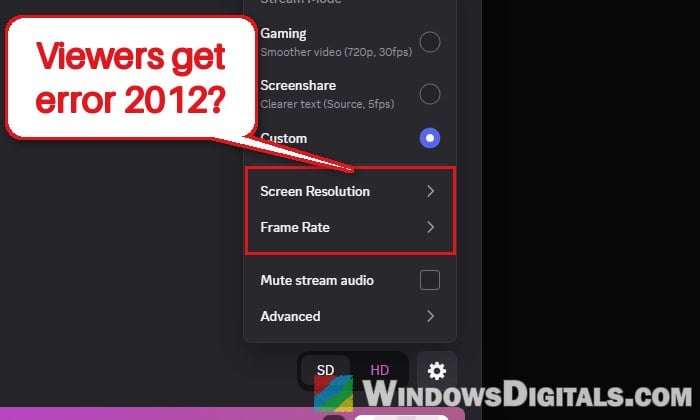
When every desktop viewer of one person’s stream gets 2012, the setting to try is on the streamer’s side. Discord suggests lowering a stream’s resolution or frame rate when a stream has problems. In early 2026, a wave of 2012 errors mostly hit people streaming from AMD Radeon graphics cards, many of them on ultrawide monitors, and their streams worked again once they streamed at a smaller resolution or set the monitor itself to a lower resolution.
If you’re the one streaming, here’s what to do:
- Stop the stream.
- Open the screen share window again, and click the gear icon at the bottom right, next to the “SD” and “HD” buttons.
- Under “Stream Mode“, if “Screenshare” (Source) is selected, switch to “Gaming” (720p, 30fps), which streams at a lower resolution than your full screen. If “Custom” is selected, open “Screen Resolution” and “Frame Rate” and pick lower values than the ones you stream at now (the higher ones need Nitro).
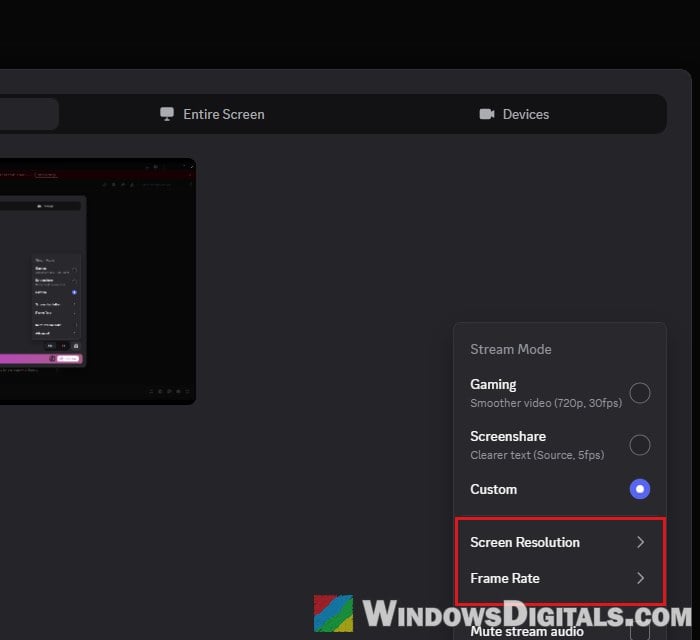
- Start streaming and have the viewers try again.
Have someone watch the stream from a browser or the phone app
This one sounds strange, but it’s the workaround that has worked for the most people on Reddit when a whole group couldn’t watch one streamer. Have one person join the voice channel and watch the stream from Discord in a web browser (discord.com) or from the Discord phone app. Once they do, the stream often starts loading for everyone else on the desktop app too, and for some, it kept working even after they left and rejoined.
It seems to work because Discord switches the whole stream to a more common video format when someone joins from a browser or phone. Discord hasn’t confirmed this, so treat it as a workaround, not a fix. If you’re the one streaming, starting the stream from Discord in your browser instead of the app is also worth a try.
Might be useful: Discord Won’t Connect to Voice Channel (Fix)
Clear Discord’s cache
Clearing Discord’s cache rarely fixes 2012 on its own, but it’s quick and safe, since Discord fills these folders again the next time it starts.
- Quit Discord completely from the system tray (as shown above).
- Press Win + R, type
%appdata%\discordand press Enter. - Open the “Cache“, “Code Cache” and “GPUCache” folders one at a time and delete everything inside them.
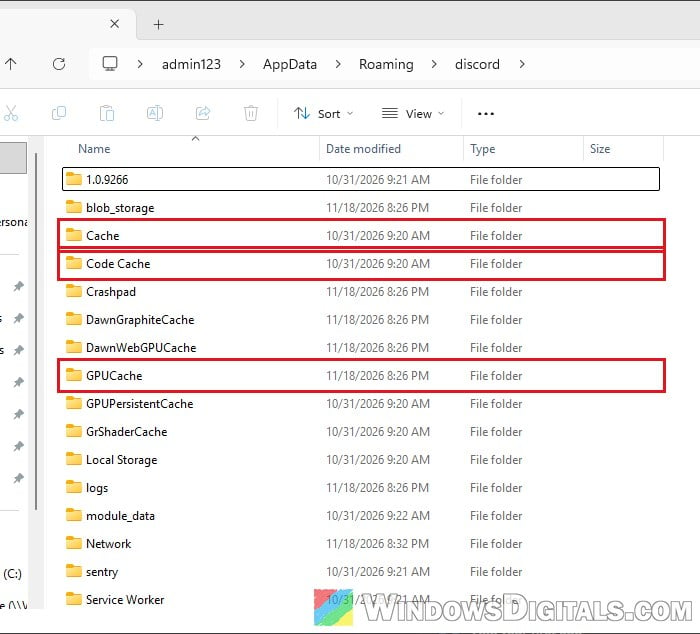
- Open Discord again and try the stream.
Update (or roll back) your graphics driver
Since hardware acceleration has Discord use your graphics card, the graphics driver matters here too. Discord suggests updating it from the maker’s website (NVIDIA, AMD or Intel).
For the steps, see: How to Update Graphics Driver in Windows 11.
If the error started right after a graphics driver update (the streamer’s, when everyone watching them gets 2012), going back to the previous driver version is worth a try.
When it’s on Discord’s side
If nothing works for you or the streamer, and especially if it started for a lot of people at the same time, it might be a bug in Discord itself, which only a Discord update will fix.
Make sure Discord is up to date: right-click the Discord icon in the system tray and select “Check For Updates…“. In the meantime, use the browser or phone workaround above. If it still won’t go away, contact Discord Support and mention error 2012, what device the streamer and the viewers are on, and whether the sound plays.