When you add funds to your Steam Wallet with Paysafecard, you might see an error that says “An unexpected error has occurred. Your purchase has not been completed. Please wait a few minutes and try again. If you encounter this error repeatedly, please contact Steam Support.” It can show up right after you enter your billing details, before Steam even takes you to the page for your 16-digit code. It looks like a problem between Steam and Paysafecard rather than anything wrong with your code. This guide will help you check whether your money is safe and get the payment through.
Also see: Unable to confirm payment method: Discord declines cards
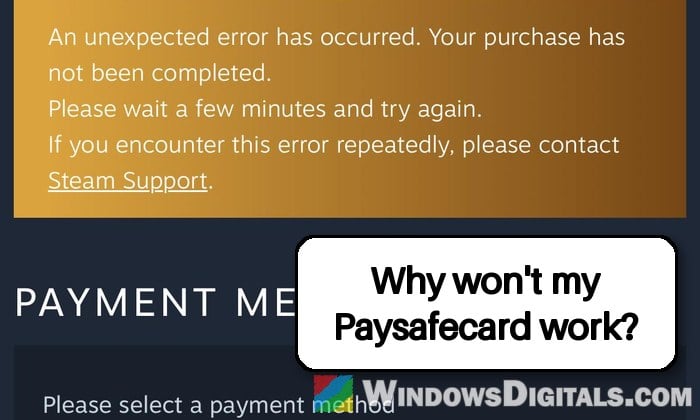
Why does Paysafecard fail on Steam with this error?
There’s no official word from Steam or Paysafecard on what causes it. It does tend to come and go, though. Paysafecard payments on Steam failed in November 2021, April 2024 and August 2026, and again in November 2026, when more than 10 people on Reddit reported it, some of them in Germany. For one of them, it failed in the Steam client, in a browser and on a phone.
One long-time user could still pay with Paysafecard on other sites, which points to the connection between Steam and Paysafecard rather than the code itself. So there may be nothing wrong on your PC at all.
Check if your Paysafecard still has its balance
Before you try anything else, find out whether any money actually left your code. When the error appears before you’ve entered the 16 digits, this payment hasn’t touched your code. Paysafecard’s own balance page will confirm it:
- Go to
https://www.paysafecard.com/en/balance-check/. - Enter your 16-digit code and submit it. You may have to solve a captcha first.
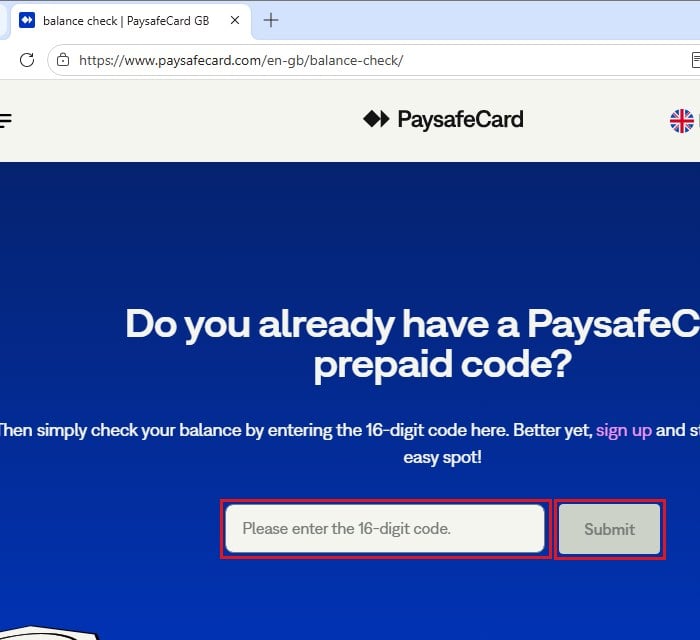
- Look at the balance. “Details” lists any payments made with the code, and a balance of 0.00 means the money has been spent.
If the full amount is still there, nothing was taken and you can try the code again later. If it’s lower or at zero and the funds never reached Steam, skip to the section on money that was taken below.
Note: Don’t leave a code sitting for too long. Paysafecard may charge a monthly fee on the remaining credit after a while (in the UK, £4 a month after about the first month). Fees differ by country, so check Paysafecard’s fees and limits page for your country.
Wait a while and try again
This is what has cleared it most often, even if it’s not a satisfying fix. In November 2021, Paysafecard payments on Steam came back by themselves after about 7 hours for one person and about 22 hours for a few others. The November 2026 failures lasted at least three days for one person, and while one report says Paysafecard works again, it may not be back for everyone.
So try again every few hours rather than over and over in a row. And don’t buy another Paysafecard while the error is still there, because a second code could fail the same way, and you’d just have more money tied up.
Switch between the Steam client and the website
Steam’s own advice for failed purchases is to try the other way of buying. If you used the Steam client, try the website in a browser, and if you used the website, try the client. This didn’t help everyone during the November 2026 failures, but it’s still worth trying once.
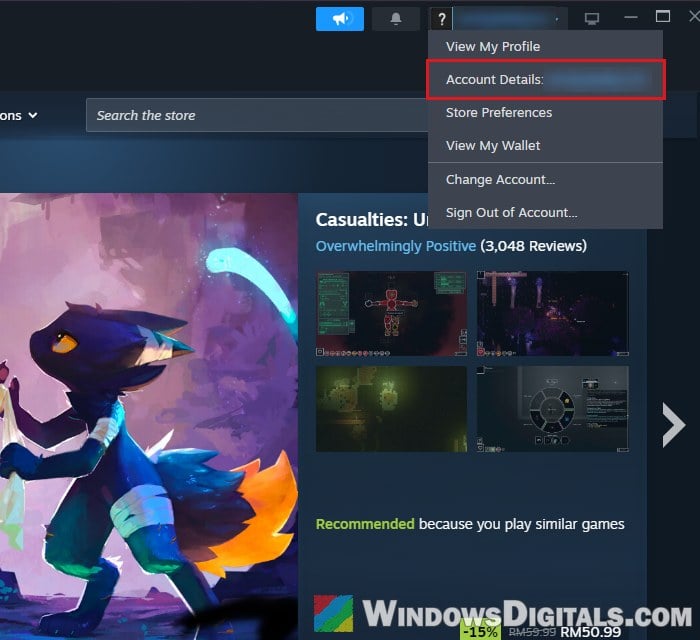
- Open the Steam client and click your account name at the top right. On the website, sign in and go to
https://store.steampowered.com/account/, then skip to step 3. - Select “Account Details“.
- Click “Add funds to your Steam Wallet“.
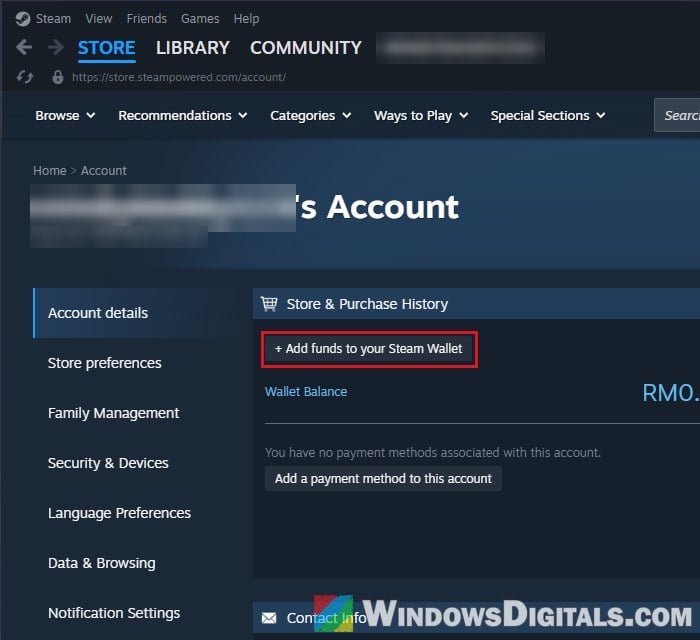
- Pick an amount.
- Choose Paysafecard as the payment method and continue.
If Steam takes you to the page for your 16-digit code without the error, it’s working again.
Turn off any VPN or proxy
Both Steam and Paysafecard suggest turning off any VPN or proxy when a payment fails. If you use one, turn it off in its own app or in Settings > Network & internet > VPN, restart your PC and try again.
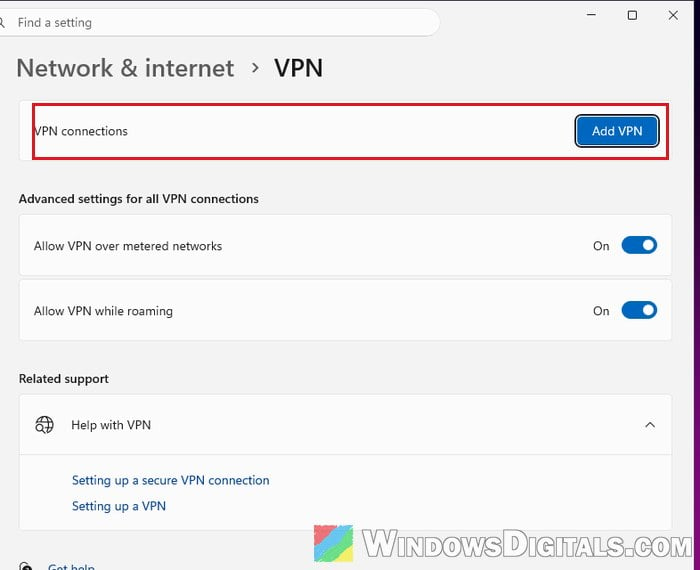
Pro tip: How to Disable VPN in Windows 11
Clear your browser’s cache and cookies
If you’re buying through the website, Paysafecard also suggests clearing your browser’s cache and cookies, or simply using a different browser or device. It only takes a minute to try, though it won’t help if the problem is on their end.
Might be useful: How to Clear Cookies in Windows 11
Check the code’s country, limit and your details
If the error keeps coming back for you while others can pay just fine, the problem might be with this particular code or payment. Paysafecard lists a few things worth checking:
- Country: Some codes only work with shops or merchants from a specific country, so check the terms that came with yours.
- Payment limit: Each country has a maximum per payment (£40 in the UK). The UK’s is on
https://www.paysafecard.com/en-gb/fees-limits/, and Paysafecard has the same page for other countries.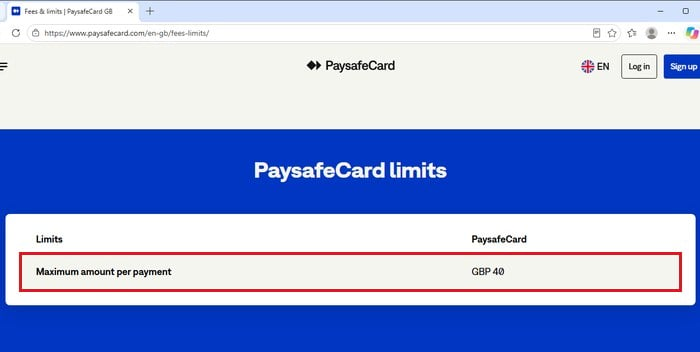
- Not enough credit: If the amount is more than what’s on the code, try a smaller amount or combine more than one 16-digit code.
- Your name and date of birth: If you have a Paysafecard account, the details you enter in the shop must match it. Special characters can trip this up, so try writing é as e, ü as ue and ß as ss.
Linked issue: Steam Age Verification Not Working in Australia (Debit Card Rejected)
What if the money was taken but never reached Steam?
This is the scary one, but it doesn’t always mean the money is lost. In one past outage, a code showed zero while Steam showed the purchase as pending, and the funds landed in the wallet about 15 hours after the person first reported it. That doesn’t always happen, so don’t wait too long. First, look at what Steam has on record:
- In Steam, click your account name at the top right.
- Select “Account Details“.
- Click “View purchase history“.
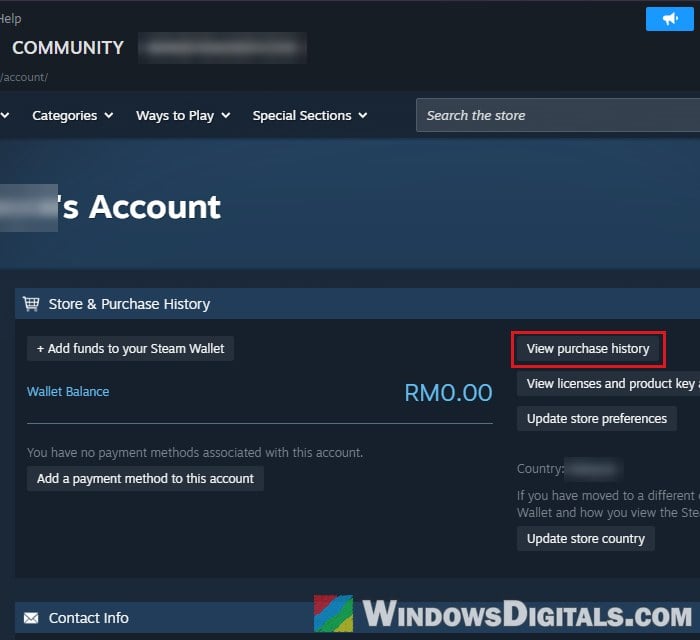
- Look for the Paysafecard payment and whether it’s listed as pending.
If the money still hasn’t arrived, contact Steam Support with your account name and the exact error message. Also contact Paysafecard through https://www.paysafecard.com/en-gb/support/contact-us/.
Use another way to add funds if you can’t wait
If you need the money on Steam right now, for example before a sale ends, the simplest way around it is a Steam Wallet card from a physical shop, which Steam itself suggests when a payment can’t be verified. Keep your Paysafecard for later, but don’t leave it too long because of the monthly fee mentioned above.
If Paysafecard works everywhere else but Steam keeps refusing you long after others are back to normal, mention that to Steam Support too. In one case, the same error on a credit card turned out to be a restriction Steam had placed on it after a payment dispute. That hasn’t been reported for Paysafecard, but only Steam can check it.