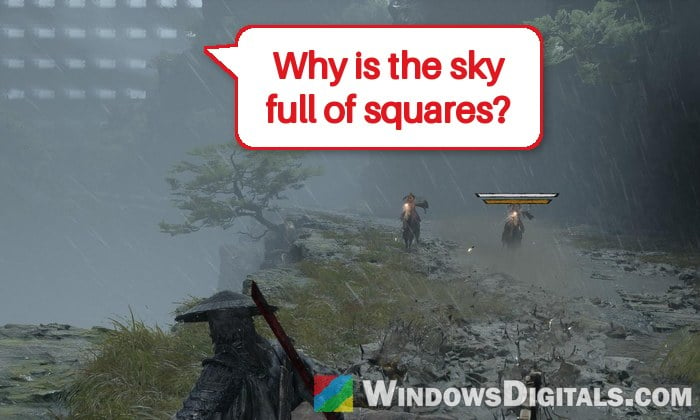
The sky in Phantom Blade Zero normally looks the way it should, but on some AMD Radeon cards it suddenly turns into a grid of bright white squares, and characters’ hair looks stretched and spiky in cutscenes. It’s not your graphics card dying. This guide will talk about what’s going on and the workarounds that have helped players until AMD fixes it.
Also see: Phantom Blade Zero Crashing at Startup or Mid-Game on PC
Why does the sky turn into white squares on AMD cards?
This is a known issue on AMD’s side. In the release notes of its Adrenalin 26.10.2 driver (October 30, 2026), AMD lists Phantom Blade Zero as a game where the sky and the hair of some characters may be rendered incorrectly. So your card is fine.
Almost every report comes from the newest Radeon RX 9000 series cards: the RX 9070 XT, RX 9070 and RX 9060 XT. Most reports name driver 26.10.1, and 26.10.2 still has it. You’ll usually notice two things:
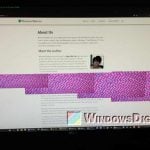
- White or bright rectangles in the sky, like a checkerboard, mostly during the horse and carriage chase at the start of the game.
- Broken hair on characters, with strands that stretch, spike or go through the face, especially in cutscenes.
As of early November, AMD hasn’t released a driver with Phantom Blade Zero support yet, so the fixes below are workarounds.
Linked issue: Phantom Blade Zero Stuttering on PC Even at High FPS
Make sure you have the November 4 update
The game’s November 4 update fixes abnormal character hair on some AMD graphics cards with certain driver versions. It doesn’t mention the sky, but if the broken hair is what bothers you most, this alone may solve it.
Steam normally installs updates by itself. To be sure, open your Steam “Library“, select Phantom Blade Zero and check that it doesn’t show a pending update. If it does, let it finish and restart the game.
The same update also stops the game from compiling its shaders again at every startup, so once they’re compiled, later launches skip that step.
Might be useful: Game Keeps Compiling Shaders Every Time I Open It (Fix)
Turn off “High-Quality Hair”
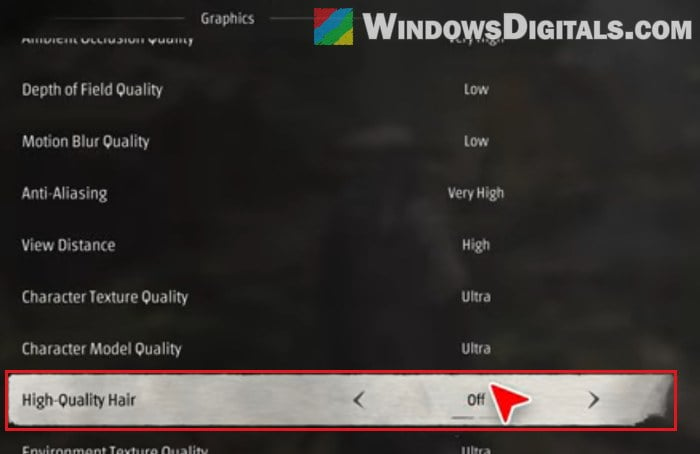
This is the workaround AMD itself gives in its driver notes. The “High-Quality Hair” option switches on the more detailed hair, and hair is one of the two things the current AMD driver draws wrong. Turning it off fixes the hair glitches, and for some players it also cleared the white squares in the sky. It doesn’t do that for everyone, though.
Here’s how to do it:
- Open the game’s settings from its menu.
- Go to the graphics settings.
- Scroll down to “High-Quality Hair” and set it to “Off“.
- Apply the change and go back to the game.
Watch a cutscene or two to see if the hair and the sky look normal again.
If the hair still glitches in cutscenes, try changing your character’s outfit. Switching to a different outfit, such as the legacy one, has stopped the hair problem for some players.
Keep playing past the opening chase
This might sound a little bit silly, but for a lot of players, the white squares only appeared during the horse and carriage chase near the start of the game. Once they got through that fight and reached the next area, the sky looked normal again.
So if you’re stuck at that part, it may be worth just pushing through it. It’s not guaranteed that the sky stays clean everywhere else, but most people who got past the chase didn’t see it again.
Roll back to AMD driver 25.12.1
If the white squares keep coming back after the opening, going back to an older AMD driver is the most reliable fix players have found for the sky. Several players on Reddit reported that driver 25.12 (Adrenalin 25.12.1, from December 2025) gets rid of the sky glitch. 26.8.1 may also work, but 25.12.1 is the version most players went back to, since the older drivers don’t seem to have this bug.
Please note that an older driver also lacks the newer fixes and game support AMD added since then. Only stay on it until AMD releases a driver that fixes Phantom Blade Zero.
Here’s what you should do:
- Open AMD’s “Drivers and Downloads – Previous Versions” page for your graphics card. For the RX 9070 XT, it’s
https://www.amd.com/en/support/downloads/previous-drivers.html/graphics/radeon-rx/radeon-rx-9000-series/amd-radeon-rx-9070-xt.html. For another card, find it through AMD’s driver search on amd.com. - Expand “Windows 11 – 64-Bit Edition“. The drivers are listed newest first.
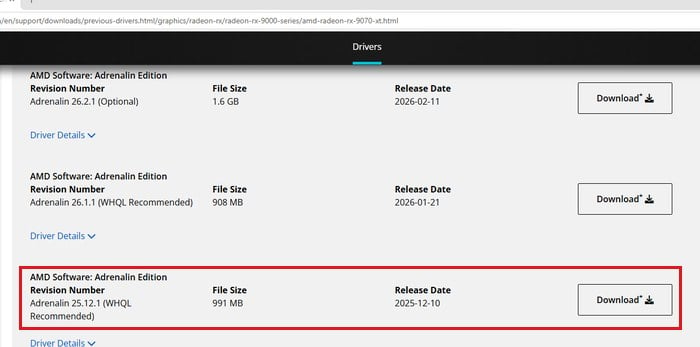
- Scroll down to “Adrenalin 25.12.1 (WHQL Recommended)“, released on 2025-12-10, and click “Download” next to it.
- Run the downloaded installer.
- In the installer’s options, select “Factory Reset“. This removes the current AMD driver and its packages before installing the older one. You won’t be able to roll back to the driver you have now, but you can always download it again.
- If you want to keep your AMD Software profiles and settings, also tick “Keep user settings“.
- Let the installer finish. With Factory Reset, it restarts your PC partway through and carries on by itself.
AMD’s own advice for going back to an older driver is to remove the current one with the AMD Cleanup Utility first, then install the version you want. If the installer gives you any trouble, do it that way.
The first launch after this takes longer, since the game compiles its shaders again for the new driver. After that, check the sky in the area where you saw the squares.
Will Windows Update replace the older driver?
It can. Windows Update sometimes installs its own AMD driver over the one you picked, which is when AMD Software warns that the graphics driver was replaced. If the white squares come back out of nowhere, check which driver version AMD Software shows, and install 25.12.1 again if it changed.
Related concern: AMD Software Warning: Graphics Driver Replaced?
Wait for AMD’s next driver
Since AMD has listed this as a known issue, the proper fix should come with one of its next Adrenalin drivers. When a new driver comes out, check its release notes for Phantom Blade Zero. Once AMD says the sky and hair corruption are fixed, install that driver (even if you rolled back to 25.12.1) and turn “High-Quality Hair” back on if you want it.