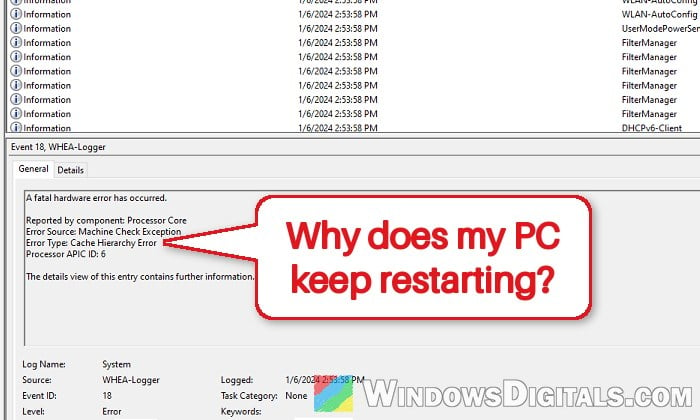
If your Windows 11 or 10 PC suddenly goes black and restarts by itself without a blue screen, often in the middle of a game or right as one loads, and Event Viewer shows a WHEA-Logger Event 18 error saying “A fatal hardware error has occurred” with “Error Type: Cache Hierarchy Error“, the processor itself is reporting the crash. It shows up mostly on AMD Ryzen 5000 processors like the 5600X, 5800X and 5800X3D. This guide will explain what the error means and show you what you can do to stop the restarts.
Also see: Windows 11/10 “Whea_Uncorrectable_Error” BSOD
What does WHEA-Logger Event 18 “Cache Hierarchy Error” mean?
WHEA (Windows Hardware Error Architecture) is how Windows records errors that the hardware reports on its own. Event 18 means the CPU raised a fatal “machine check” error, so Windows had to restart right away. The “Cache Hierarchy” part says which part of the processor complained, and the Processor APIC ID tells you which processor thread reported it.
Microsoft says these errors usually come from the hardware (heat, memory or a failing processor), and only rarely from a driver. On Ryzen PCs, the most common reasons are:
- Overclocking or undervolting, such as PBO (Precision Boost Overdrive), a negative Curve Optimizer or a Ryzen Master profile.
- The CPU not getting quite enough voltage when it drops into a low-power idle state or suddenly jumps to full load, like when a game goes from its loading screen to the menu.
- Unstable RAM settings (XMP, DOCP or EXPO), since the memory controller sits inside the CPU.
- A CPU that is failing or has degraded over time, even at stock settings, sometimes after years of working fine.
How to find the error in Event Viewer
Before changing anything, make sure the restarts really come with this error. Here’s how to check:
- Press Win + R, type
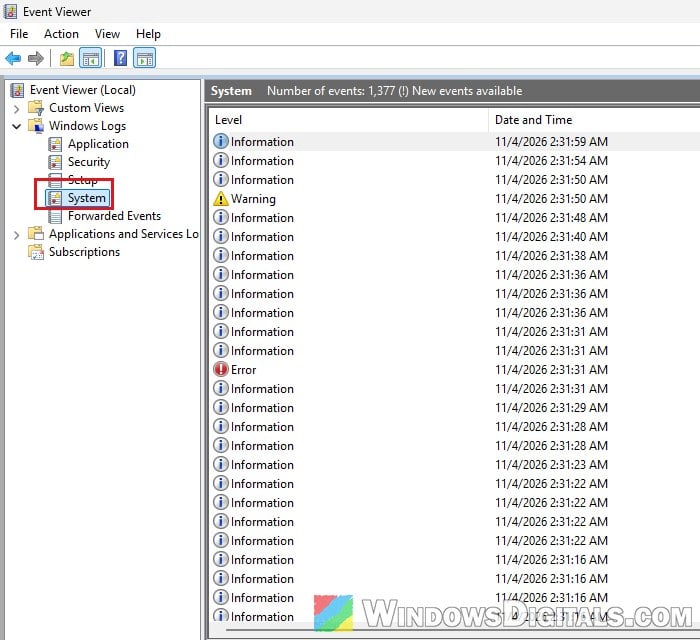
eventvwr.mscand press Enter. - In the left pane, go to Windows Logs > System.
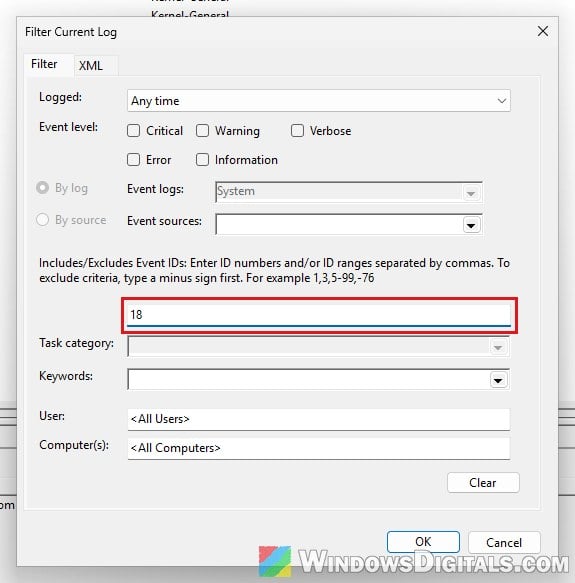
- Click Filter Current Log on the right, type “18” in the <All Event IDs> box and click OK.
- Open any error whose source is WHEA-Logger and read its Error Type and Processor APIC ID. In the full log, you’ll usually also find a Kernel-Power 41 event from the same moment, which only says the PC didn’t shut down cleanly.
If the APIC ID is always the same number, one core may be weaker than the rest. For most people, it changes each time. Some PCs show “Bus/Interconnect Error” instead, which points to the same kind of problem.
Linked issue: The system has rebooted without cleanly shutting down first
Undo any CPU overclock or undervolt first
If you’ve ever turned on PBO, set a negative Curve Optimizer or applied a Ryzen Master profile, start here. Microsoft’s own advice for this kind of hardware error is to turn overclocking off, and a too-aggressive undervolt is one of the most common causes of Event 18 on Ryzen.
- Restart your PC and press the BIOS key (usually Delete or F2) while it boots.
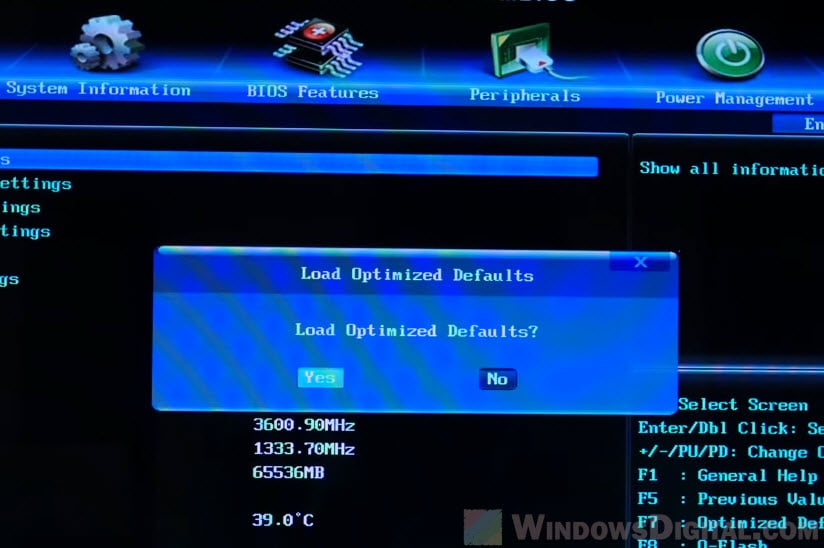
- Look for Load Optimized Defaults (or similar), confirm it, then save and exit.
- If you’d rather keep your other settings, find Precision Boost Overdrive and set it to Disabled, and set Curve Optimizer back to 0.
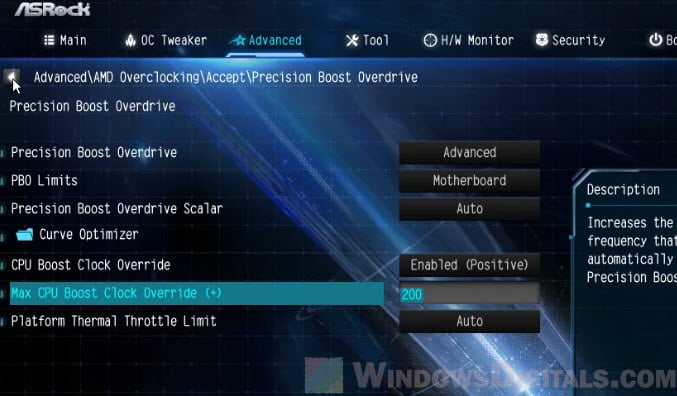
Please note that setting PBO to Manual with a 1X scalar still leaves it on, so pick Disabled. Ryzen Master can also leave its values in the BIOS, and resetting the CMOS clears those.
Related concern: Auto OC Ryzen 7000 or 5000 PBO2 (Curve Optimization)
Set “Power Supply Idle Control” to “Typical Current Idle”
When a Ryzen processor sits idle, it can drop its current very low to save power. On some PCs, the CPU can’t recover cleanly from that state, which is why the restart often happens at a loading screen, at the start of a game or when the PC is left alone. Setting this option to Typical Current Idle makes that idle behavior less aggressive. This is the change that has fixed it for the most people on Reddit.
- Enter the BIOS again and switch to the advanced mode if it opens in a simple view.
- Find Power Supply Idle Control. It’s usually under AMD CBS in the advanced or CPU settings, though the exact place differs between motherboard brands. Some newer BIOS versions don’t list it at all. If yours doesn’t, go straight to Global C-state Control below.
- Change it from Auto or Low Current Idle to Typical Current Idle.
- Save and exit, then use the PC as you normally would for a few days.
Also turn off “Global C-state Control” if it keeps happening
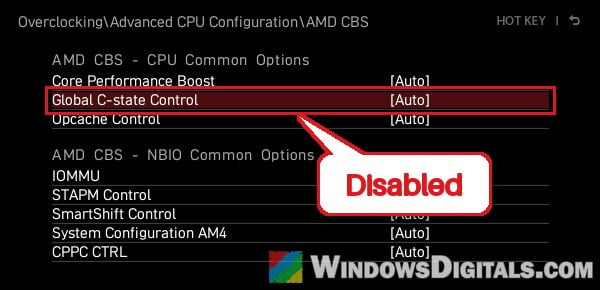
C-states are the processor’s deeper power-saving states. If the restarts continue, set Global C-state Control to Disabled. It’s usually in the AMD CBS menu too, under CPU Common Options. On the MSI board below, that menu sits under Overclocking > Advanced CPU Configuration. For some people, only both changes together stopped the restarts. The CPU will use a little more power at idle.
Check your RAM and turn off XMP
Since the memory controller is part of the CPU, unstable memory can also end in this error. Turn off XMP, DOCP or EXPO in the BIOS so the RAM runs at its default speed, and see if the restarts stop. If they do, the memory overclock was the problem.
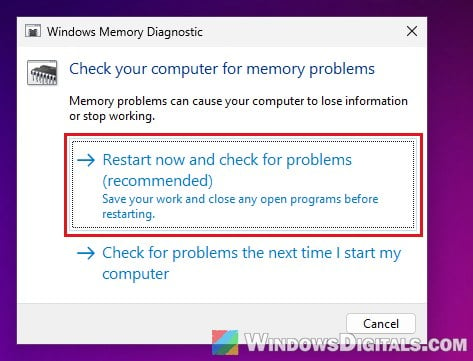
You can also test the RAM with Windows’ own tool. Press Win + R, type mdsched.exe and press Enter, then choose “Restart now and check for problems (recommended)“.
Pro tip: How to See Windows Memory Diagnostic Results in Windows 11
Give the CPU a little more voltage (advanced)
If the error still shows up at stock settings, the processor may simply need slightly more voltage than it gets by default. The usual way is a positive Curve Optimizer value, such as +5 to +10 for all cores, or just for the core your APIC IDs point to. Another way is a small positive Vcore offset, raised in tiny steps (about 0.05 V at a time).
Be warned: Voltage changes can make things worse or damage the CPU if you overdo them. Only raise it by small steps and keep an eye on temperatures. If you’re not sure what you’re doing, it’s better to just get someone to help you instead. Also, if you find yourself having to raise the voltage again and again, the CPU is most likely degrading, and more voltage only buys time.
Did it start right after a BIOS update?
A BIOS update is the usual suggestion for this error, but on its own it didn’t help several people who tried it. If the restarts only began after a BIOS update, though, going back to the previous version from your motherboard’s support page is worth a try.
Be warned: Flashing a BIOS can brick your motherboard if the power cuts out or the wrong file is used. Follow your motherboard maker’s instructions exactly, and leave it to someone experienced if you’re unsure.
Still happening at stock settings? The CPU may be failing
If you get Event 18 with everything at default and it gets more frequent over time, the bad news is that the processor itself is most likely failing. Stress-testing tools like OCCT or CoreCycler can help confirm it.
If your CPU is still under warranty, contact AMD or the store you bought it from and ask for a replacement. With this error, a new CPU is sometimes the only thing that stops the restarts, even after every BIOS change above.